

What is CloudTrail?
AWS CloudTrail is a service provided by AWS that one can use for operational and risk auditing, governance, and compliance of the AWS account. Actions taken by a user, role, or an AWS service are recorded as events in CloudTrail.
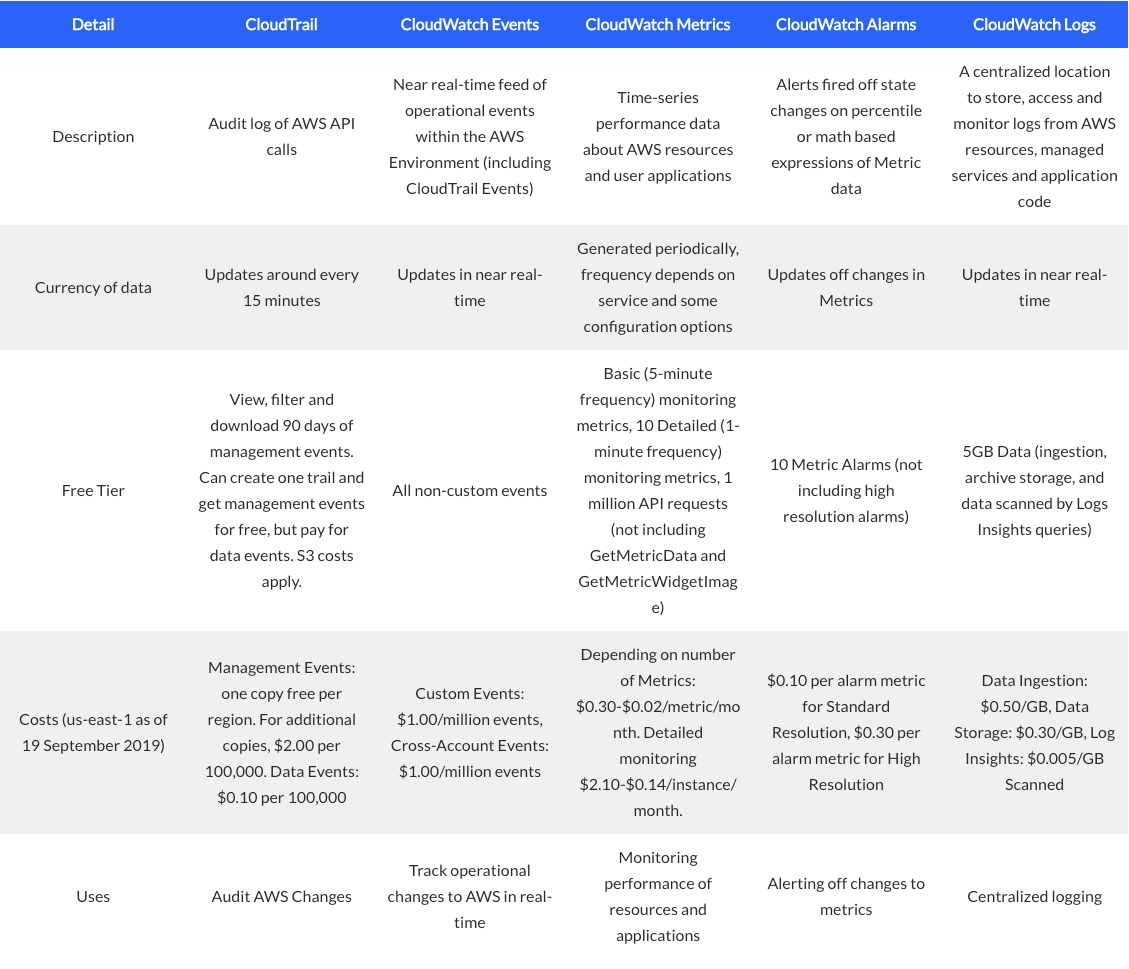
CloudTrail Vs CloudWatch?
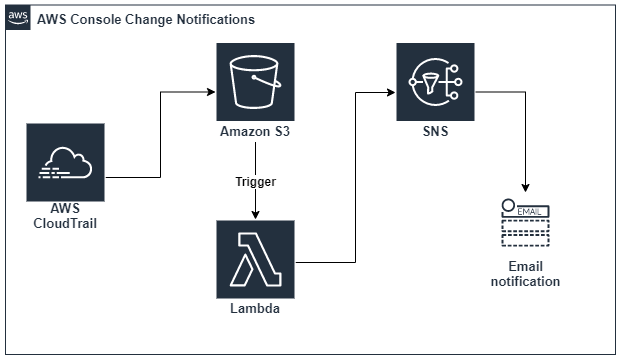
Steps to set up –
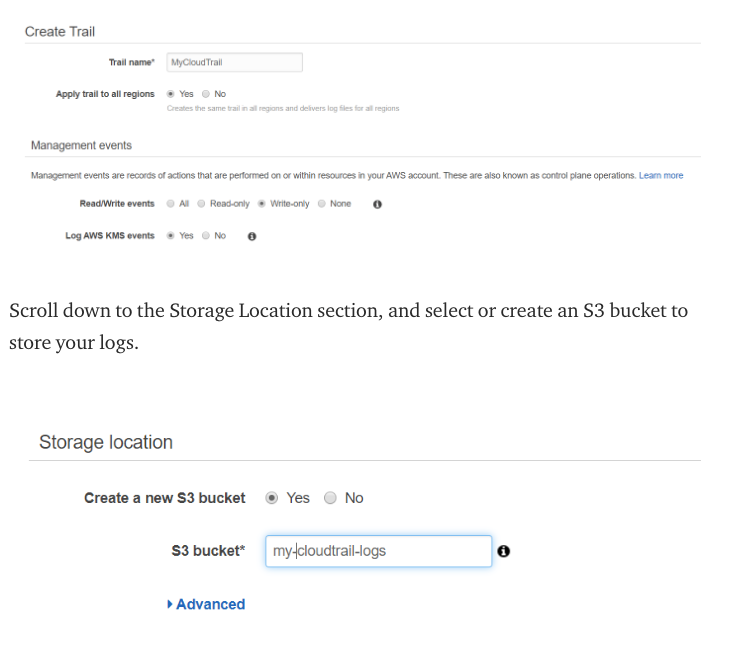
Enable CloudTrail — CloudTrail is often used for security investigations, compliance, and auditing purposes. and you can use its web interface to search the events it logs.
Make some changes in the AWS environment. For example — launch a t.2 micro instance, create an empty Lambda function, anything will work.
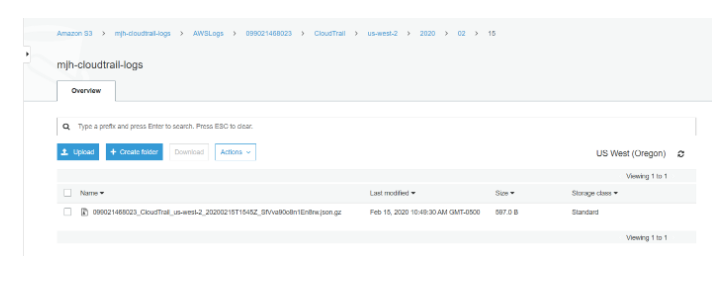
If you download a log file from this bucket, you’ll see an array (“Records”) of events. Each event has a lot of metadata attached to it.
Create a Lambda to Process CloudTrail Logs — each modification to our AWS infrastructure logged to S3, we need to write a function to parse the data. We’ll do this in Lambda because it’s serverless and that fits our need to invoke the function only when new events are recorded.
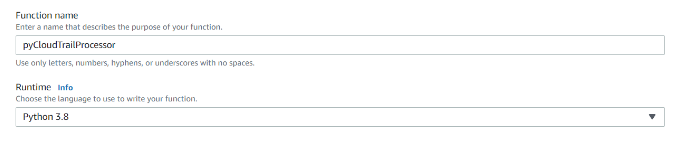
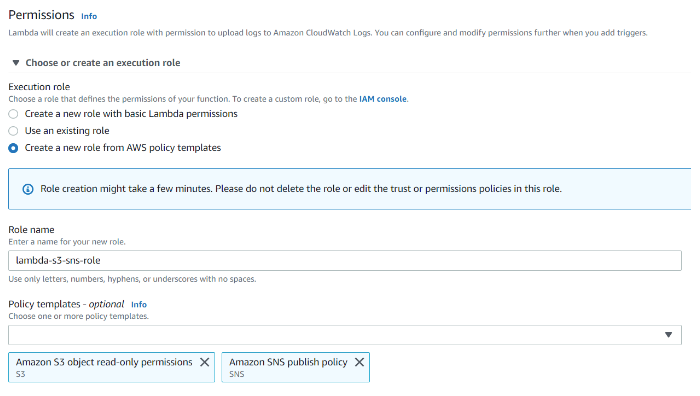
Permissions required — “S3 object read-only” and “SNS publish”
The function needs permission to read from S3 and to publish notifications to SNS.
Lambda has functionality to send detailed reports on email id to the SNS subscribers and activity snapshot on Slack channel.
Lambda Function to push Slack notification and trigger SNS –
import json
import urllib.parse
import boto3
import io
import gzip
import re
import loggingimport urllib.request
import urllib.parse
import urllib.errors3 = boto3.client(‘s3’)
sns = boto3.client(‘sns’)
sns_arn = “”
SLACK_WEBHOOK_URL = “"USER_AGENTS = {“console.amazonaws.com”, “Coral/Jakarta”, “Coral/Netty4”}
IGNORED_EVENTS = {“DownloadDBLogFilePortion”, “TestScheduleExpression”, “TestEventPattern”, “LookupEvents”,
 “listDnssec”, “Decrypt”, “REST.GET.OBJECT_LOCK_CONFIGURATION”, “ConsoleLogin”}def post_to_sns(user, event) -> None:
 message = f’Manual AWS Change Detected: {user} → {event}’
 sns_publish(message)def post_to_sns_details(message) -> None:
 message = {“Manual AWS Change Detected”: message}
 sns_publish(message)

def post_to_slack(user, event):
 message = f’Manual AWS Change Detected: {user} → {event}’
 slack_message = {
 # ‘channel’: SLACK_CHANNEL,
 # ‘username’: SLACK_USER,
 ‘text’: “%s” % (message)
 }
 encoded_slack_message = str(json.dumps(slack_message))
 encoded_slack_message = encoded_slack_message.encode(‘utf-8’)
 header = {“Content-type”: “application/x-www-form-urlencoded”,”Accept”: “text/plain”}
 req = urllib.request.Request(SLACK_WEBHOOK_URL, data=encoded_slack_message, headers=header)
 try:
 response = urllib.request.urlopen(req)
 response.read()
 logging.info(“Message posted to %s”, slack_message[‘text’])
 except urllib.error.HTTPError as e:
 logging.error(“Request failed: %d %s”, e.code, e.reason)
 except urllib.error.URLError as e:
 logging.error(“Server connection failed: %s”, e.reason)def sns_publish(message) -> None:
 sns.publish(
 TargetArn=sns_arn,
 Message=json.dumps({‘default’: json.dumps(message)}),
 MessageStructure=’json’
 )def check_regex(expr, txt) -> bool:
 match = re.search(expr, txt)
 return match is not Nonedef match_user_agent(txt) -> bool:
 if txt in USER_AGENTS:
 return Trueexpressions = (
 “signin.amazonaws.com(.*)”,
 “^S3Console”,
 “^\[S3Console”,
 “^Mozilla/”,
 “^console(.*)amazonaws.com(.*)”,
 “^aws-internal(.*)AWSLambdaConsole(.*)”,
 )for expresion in expressions:
 if check_regex(expresion, txt):
 return Truereturn Falsedef match_readonly_event_name(txt) -> bool:
 # starts with
 expressions = (
 “^Get”,
 “^Describe”,
 “^List”,
 “^Head”,
 )
 for expression in expressions:
 if check_regex(expression, txt):
 return Truereturn Falsedef match_ignored_events(event_name) -> bool:
 return event_name in IGNORED_EVENTSdef filter_user_events(event) -> bool:
 is_match = match_user_agent(event[‘userAgent’])
 is_read_only = match_readonly_event_name(event[‘eventName’])
 is_ignored_event = match_ignored_events(event[‘eventName’])
 is_in_event = ‘invokedBy’ in event[‘userIdentity’] and event[‘userIdentity’][‘invokedBy’] == ‘AWS Internal’status = is_match and not is_read_only and not is_ignored_event and not is_in_eventreturn statusdef get_user_email(principal_id) -> str:
 words = principal_id.split(‘:’)
 if len(words) > 1:
 return words[1]
 return principal_iddef lambda_handler(event, context) -> None:
 “””
 This functions processes CloudTrail logs from S3, filters events from the AWS Console, and publishes to SNS
 :param event: List of S3 Events
 :param context: AWS Lambda Context Object
 :return: None
 “””
 for record in event[‘Records’]:
 # Get the object from the event and show its content type
 bucket = record[‘s3’][‘bucket’][‘name’]
 key = urllib.parse.unquote_plus(record[‘s3’][‘object’][‘key’], encoding=’utf-8')
 try:
 response = s3.get_object(Bucket=bucket, Key=key)
 content = response[‘Body’].read()with gzip.GzipFile(fileobj=io.BytesIO(content), mode=’rb’) as fh:
 event_json = json.load(fh)
 output_dict = [record for record in event_json[‘Records’] if filter_user_events(record)]
 if len(output_dict) > 0:
 post_to_sns_details(output_dict)
 for item in output_dict:
 post_to_slack(get_user_email(item[‘userIdentity’][‘principalId’]), item[‘eventName’])
 # post_to_sns(get_user_email(item[‘userIdentity’][‘principalId’]), item[‘eventName’])return response[‘ContentType’]
 except Exception as e:
 print(e)
 message = f”””
 Error getting object {key} from bucket {bucket}.
 Make sure they exist and your bucket is in the same region as this function.
 “””
 print(message)
 raise e
Create SNS Topic — we want to send the actual notification. We’ll use Amazon’s Simple Notification Service (SNS), which is a very straightforward service that allows you to create a topic and then publish/subscribe to it.
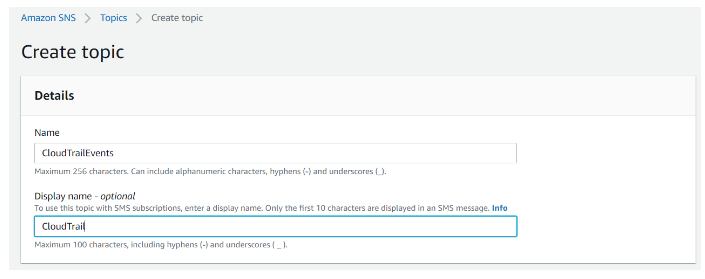
Add subscription in the SNS topic.
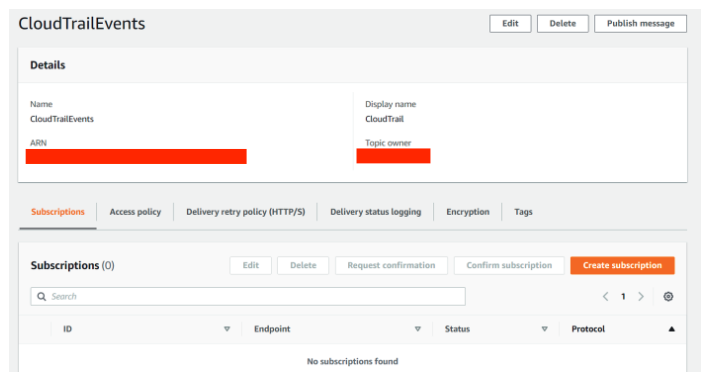
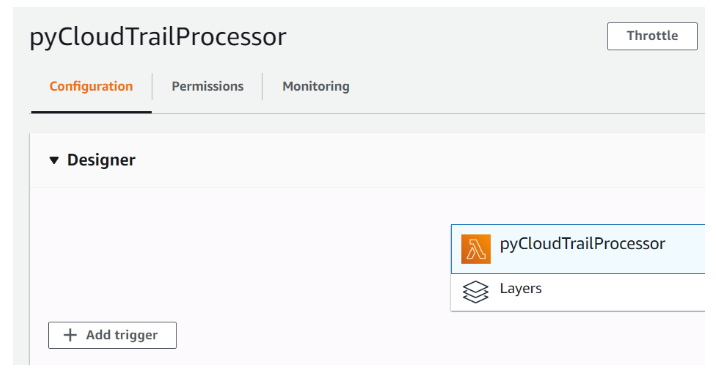
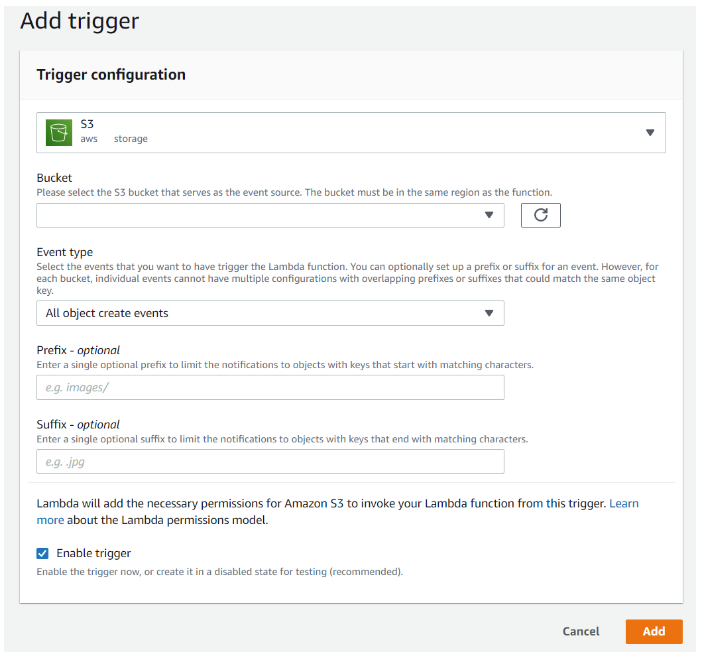
Trigger Lambda on S3 Events — create the trigger to invoke our Lambda function whenever a new CloudTrail log is created in the S3 bucket.
Select the S3 bucket where your CloudTrail logs are written to. For Event Type, choose ‘all object create events’ to invoke our function whenever new objects are created within that bucket. Make sure ‘Enable Trigger’ is selected to activate this trigger immediately, and then click ‘Add.’
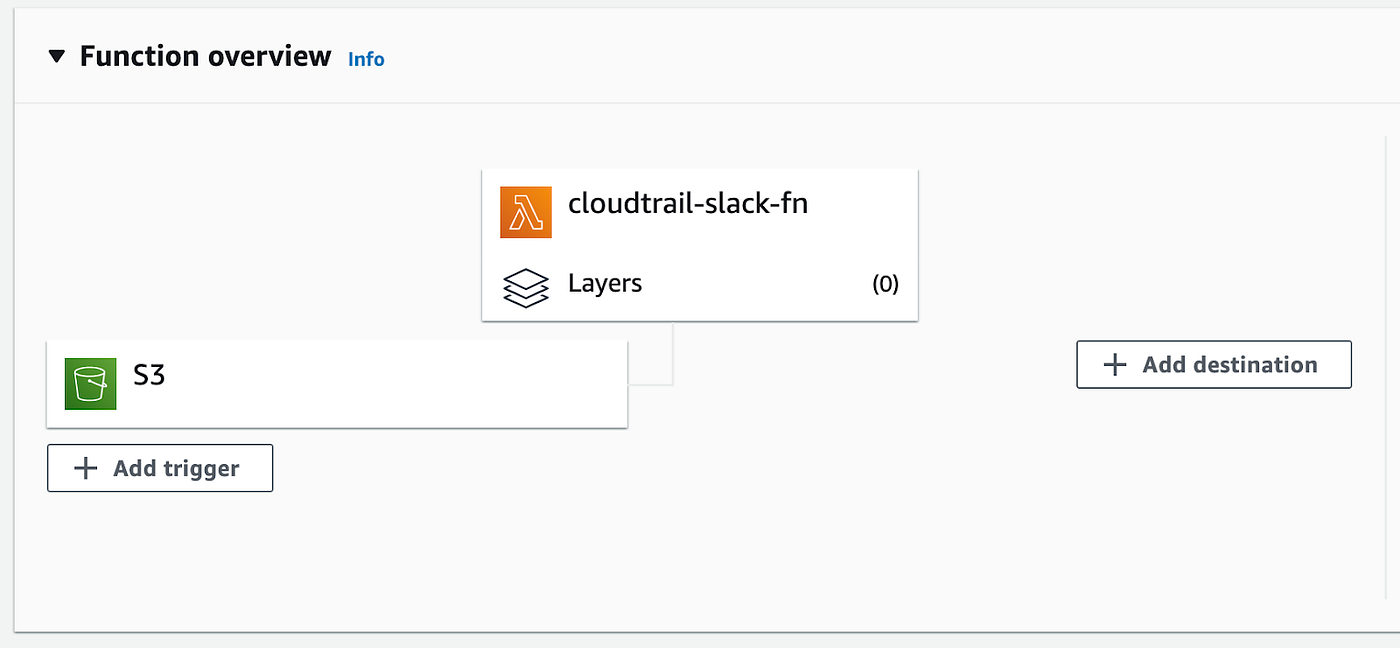
You should see the trigger on the designer view after it is created.
Test It Out — Simply log out of AWS account and log back in again. It should send an email and slack message sometime.