

Before moving on to password Encryption and Decryption, I will give a quick review on types of password formats in DNN.
Password Format
There are three password formats in DNN
- Clear
- Hashed
- Encrypted
The PassworFormat property indicates how password is stored in database.
Clear indicates that password is stored in plain text. No encryption is done.
Hashed passwords are hashed using one way hashing algorithm. It means once the data is encrypted, you can not decrypt it.
Encrypted password are encrypted and stored in database. These passwords can also be decrypted.
You will find the passwordFormat in your web.config file of your DNN installation.
passwordFormat=”[Clear|Hashed|Encrypted]”
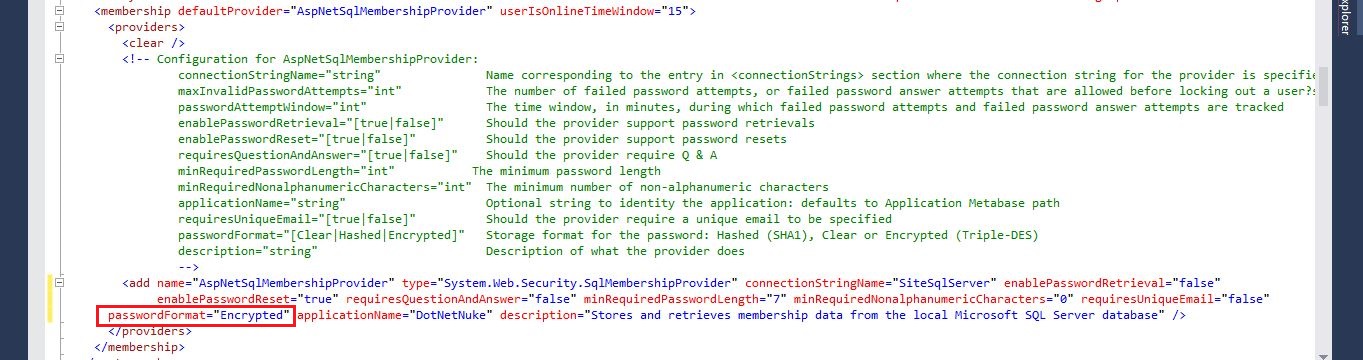
By default the red marked passwordFormat in web.config file is Hashed.
Password Decryption
If you want to decrypt password, first thing you need to do is change passwordFormat to Encrypted as shown in above picture.
passwordFormat=”Encrypted”
Note : If you already have users in aspnet_Membership database table, all you need to do is register a user after making changes in web.config file as mentioned above. Copy Password, PasswordFormat and PasswordSalt fields in aspnet_Membership database table of newly registered user to all the other rows of the table. This will reset the password of all users. After that users can change their password.
passworFormat for Encrypted is 2.
passworFormat for Hashed is 1.
passworFormat for Clear is 0.
My WebServices.cs file looks something like this –
using System;
using System.Collections.Generic;
using System.Linq;
using System.Web;
using System.Net;
using System.Net.Http;
using DotNetNuke.Common.Utilities;
using DotNetNuke.Entities.Users;
using DotNetNuke.Web.Api;
using DotNetNuke.Security.Membership;
using DotNetNuke;
using System.Text;
using DotNetNuke.Entities.Users;
using System.Security.Cryptography;

namespace YourNamespaceHere {

 public class YourClassName: DnnApiController {
  //------------------------------------------------------------------------

  /// <summary>
  /// Get clear text password or decrypted password
  /// </summary>
  [AllowAnonymous]
  [HttpGet]
  public HttpResponseMessage GetPassword(string Password) {
   try
   {
    var PasswordDecrypted = new YourNameSpaceName.PasswordDecryption().GetClearTextPassword(Password);
    return Request.CreateResponse(HttpStatusCode.OK, PasswordDecrypted);
   }
   catch (Exception exc) {
    return Request.CreateErrorResponse(HttpStatusCode.InternalServerError, exc);
   }
  }

  //--------------------------------------------------------------------------

  /// <summary>
  /// Log in programmatically
  /// </summary>
  [AllowAnonymous]
  [HttpGet]
  public HttpResponseMessage Login(string Password, string UserName) {
   try
   {
    var loginStatus = UserLoginStatus.LOGIN_FAILURE;
    var Login = UserController.UserLogin(0, UserName, Password, "", "", "", ref loginStatus, false);
    //UserLogin(portalId, UserName, Plain text Password, "", "", "", ref loginStatus, false);
    return Request.CreateResponse(HttpStatusCode.OK, "Logged in Successfully");
   }
   catch (Exception exc) {
    return Request.CreateErrorResponse(HttpStatusCode.InternalServerError, exc);
   }
  }
 }
}
PasswordDecryption.cs file looks like this –
using System;
using System.Collections.Generic;
using System.Linq;
using System.Web;
using DotNetNuke.Data;
using DotNetNuke.Common.Utilities;
using System.Web.Security;
using System.Text;
using DotNetNuke.Entities.Users;
using System.Configuration.Provider;

namespace YourNamespaceName
{

 /// <summary>
 /// Summary description for PasswordDecryption
 /// </summary>

 public class PasswordDecryption: SqlMembershipProvider
 {
  private static readonly PasswordDecryption _instance = new PasswordDecryption();
  public override MembershipPasswordFormat PasswordFormat
  {
   get {
    return MembershipPasswordFormat.Encrypted;
   }
  }

  public string GetClearTextPassword(string encryptedPwd)
  {
   byte[] encodedPassword = Convert.FromBase64String(encryptedPwd);
   byte[] array = this.DecryptPassword(encodedPassword);
   // using System.Web.Security.SqlMembershipProvider
   if (array == null)
   {
    return null;
   }
   return Encoding.Unicode.GetString(array, 16, array.Length - 16);
  }
 }
}
I made this program to meet my requirement but you can play with the code to optimize it.